Documentation
Postman & Insomnia
The SecuriThings API Postman Collection includes the authentication setup.
Download the Postman Collection
To set up Postman or Insomnia to use the SecuriThings API, you can see an example of how to set up the authentication in the following images.
Postman
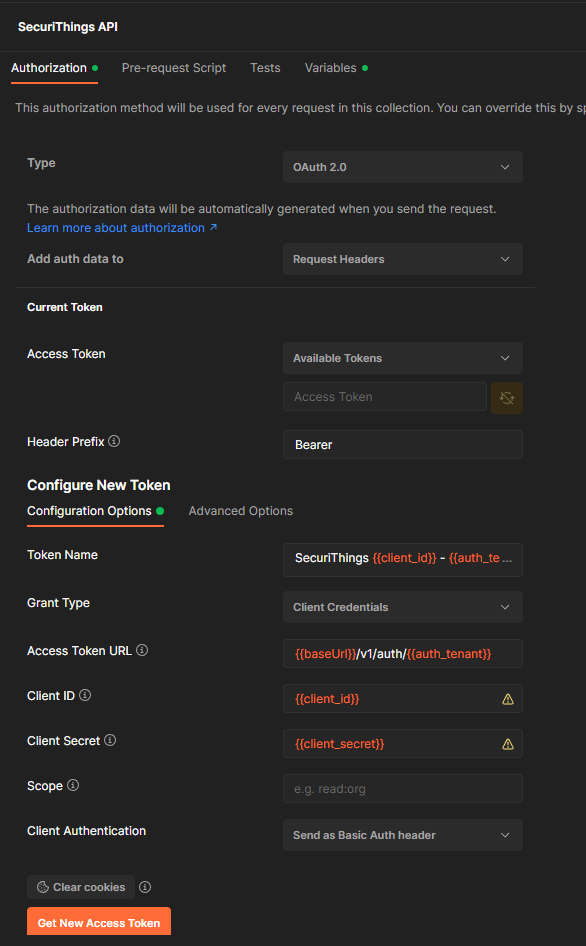
- Open Postman and create a new request.
- In the Authorization tab, select
OAuth 2.0and setAdd Authorization Data totoRequest Headers. - Set the Access Token URL to
https://api.securithings.com/v1/auth/<organization>. - Change the Grant Type to
Client Credentialsand fill in the fields with the credentials provided by the SecuriThings team. - Change Client Authentication to
Send as Basic Auth header.
An example of the configuration can be seen in the following image:
Insomnia
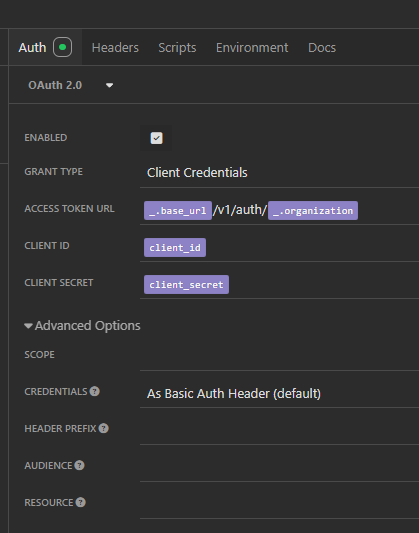
- Open Insomnia and create a new request.
- In the Authentication tab, select
OAuth 2.0and setGrant TypetoClient Credentials. - Set the Access Token URL to
https://api.securithings.com/v1/auth/<organization>. - Fill in the fields with the credentials provided by the SecuriThings team.
- Under Advanced Options, ensure
Credentialsis set toAs Basic Auth Header. (should be default)
An example of the configuration can be seen in the following image: